
Contents
- What Is a Lookalike Audience and When Should You Use It?
- Prepare the Seed File Before Creating a Lookalike
- How to Create a Lookalike Customer File in Facebook Ads
- Which Data Source Should You Use for a Lookalike File?
- How to Run and Optimize Lookalike Audiences for More Stable Sales
- Mistakes That Prevent You From Creating a Lookalike Customer File
- Key Notes for Using Lookalike Without Diluting Performance
- Frequently Asked Questions About Building the Right Lookalike Customer File
If you are running ads for sales and cold audiences are getting more expensive, the problem usually is not the ad first but the source file used to create lookalikes. How to build the right lookalike customer file starts with input data that is clean enough, such as phone numbers, email addresses, pixels, or groups of people who have interacted with the fanpage. For online store owners, advertisers, and marketers, the practical goal is to know which source to choose, which file to use first, and how to check the quality of the seed file before scaling. Doing this step correctly helps avoid thin audiences, wrong signals, and wasted budget from the start.
What Is a Lookalike Audience and When Should You Use It?
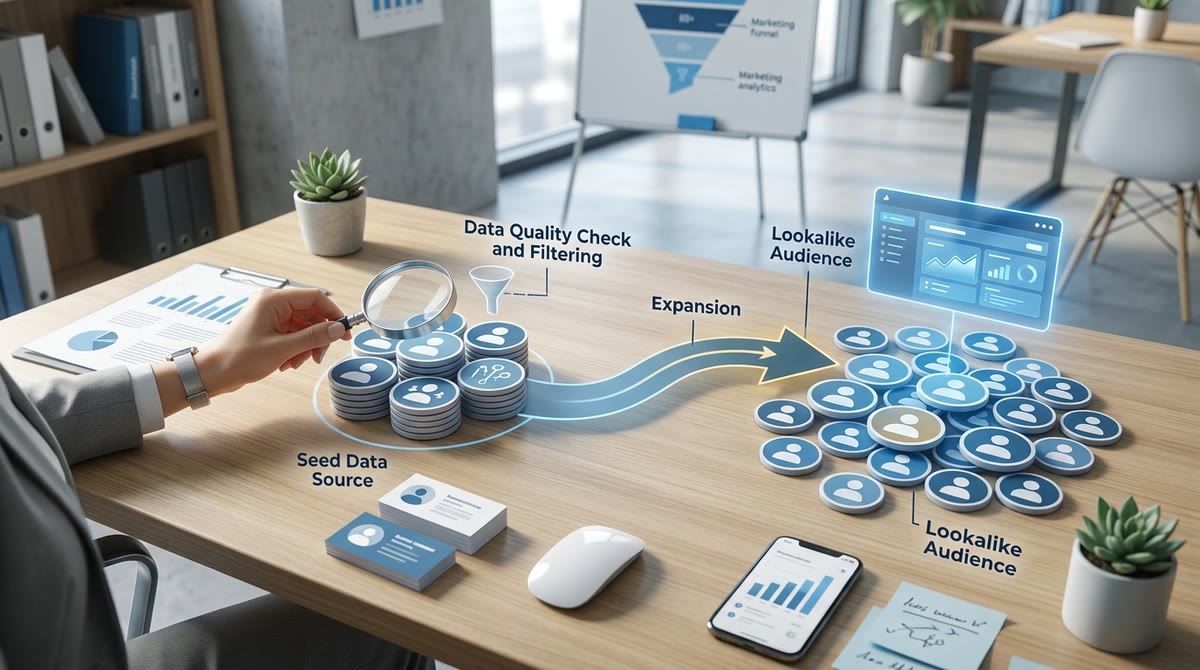
A Lookalike Audience is a user file with behaviors or characteristics similar to your seed audience, used to expand your search for new customers on Facebook Ads. When you already have customer data or strong engagement data, this is a way to build the right lookalike customer file that works better than manual interest targeting because the input signal is clearer.

How Is Lookalike Different From Interest and Remarketing Audiences?
Lookalike is used to find new people with a high likelihood of interest. Remarketing follows people who have already viewed, messaged, or added to cart. Interest audiences are a manual way to target declared behaviors. If you are running ads for a new store, remarketing helps close the sale, while lookalike is more suitable once you have enough data to expand.
| Audience type | Goal | Warmth | How to use |
|---|---|---|---|
| Lookalike | Expand to new audiences | Medium | From strong seed data |
| Remarketing | Follow up with people who engaged | High | Close sales, remind |
| Interest audience | Manually choose interested groups | Low to medium | Market testing, early stage |
Why Does Seed Quality Decide 80% of the Result?
A seed audience is the original data source the system learns from and uses to find similar people. The closer the seed is to actual buying behavior, the better the lookalike audience will be; conversely, if it includes many casual viewers or duplicate records, the audience will become diluted and harder to convert.
Good seed checklist:
- Contains real actions: purchases, leads, messages, add-to-cart events.
- Clean data, few duplicates, correct country or region.
- Separated by quality, such as buyers and people who only engaged.
Signs of a weak seed:
- Pulling too broadly from everyone who ever visited the fanpage.
- Using old phone lists, incorrectly formatted data, or data with little relevance.
- Mixing multiple behavior types into one file.
Prepare the Seed File Before Creating a Lookalike
A good seed file is clean, comes from a valid source, and matches the ad objective. When prepared correctly, how to build the right lookalike customer file will produce steadier signals and reduce upload errors from the start.
Which Source Should You Use as Seed: Phone Number, Email, Pixel, or Engagers?
The seed source should be as close as possible to the target behavior. If you have a purchase list, creating a lookalike customer file from phone numbers or creating a lookalike file from customer email addresses often gives clearer signals because that is verified data. When CRM data is limited, creating a lookalike audience from Facebook Pixel is more suitable for website conversion goals. If the file is small, creating a lookalike from fanpage engagers should only be used when you do not yet have purchase or signup data.

- Prioritize end-of-funnel behavior data: purchases, signups, leads.
- Choose a source close to the ad objective, not randomly.
- If the source is only engagement, treat it as a temporary option.
Clean and Format the Data to Avoid Upload Errors
Clean data makes it easier to upload customer files and reduces errors when creating a lookalike audience. Before uploading to Ads Manager, standardize columns, remove incomplete records, and delete duplicates.
- Delete duplicate rows in the file.
- Keep each column in a consistent format, such as email, phone number, and name.
- Remove data with missing characters, incorrect structure, or invalid records.
- Check that the file matches the platform template before uploading.
| What to do | Purpose | |—|—| | Remove duplicate records | Avoid inflating the file and lowering seed audience quality | | Filter out formatting errors | Reduce the chance of file rejection | | Keep columns consistent | Make data mapping easier during upload | | Prioritize recent data | Ensure the file reflects current behavior |
If the list comes from multiple sources, set one standard convention before uploading: the same phone format, the same email structure, the same data columns. This is a small step, but it often determines whether a lookalike customer file built from old customers will work at all.
How to Create a Lookalike Customer File in Facebook Ads
How to build the right lookalike customer file in Facebook Ads is the process of creating a new audience with behavior similar to your original data source. Doing it correctly, from source selection to percentage choice, will make the audience easier to use when running ads.
How to Choose the Right Country, Region, and Data Source
Choosing the right country, region, and data source is the decisive step for keeping the lookalike audience aligned with the market you sell to. The same source can still be created if the geography is wrong, but the people in the audience may have different buying habits, different language, or different conversion potential.
When doing how to create a lookalike audience in Facebook Ads, go to Audiences, choose Create audience, then select Lookalike audience. After that, choose the data source first, because the source is the “base sample” the system uses to find the most similar people. The source can be a list of buyers, a customer email list, a phone number list, or a list of fanpage engagers and Pixel users if the quality is strong enough.
Check in this order:
- Does the source have enough data and the right target behavior?
- Does the country or region match where you sell?
- Do you need to separate each market?
If you sell domestically, choose one country to avoid diluting the audience. If you run multiple markets, separate each advertising region so you can compare performance more easily. This is a safer way to build a lookalike from old customers than combining everything and optimizing later.
Should You Choose 1%, 3%, 5%, or 10% Lookalike?
The lookalike percentage is the degree of expansion relative to the original source: the lower the percentage, the more similar the audience is to the source; the higher the percentage, the broader the audience becomes. The choice of lookalike percentage should depend on whether your goal is testing, scaling, or finding new customers.
| % level | When to use | Strength | What to note |
|---|---|---|---|
| 1% | First audience test | Closer to the seed, easier to control | Narrow audience, saturates quickly |
| 3% | Want moderate expansion | Balance between similarity and reach | Need to monitor lead quality |
| 5% | Want more stable scaling | Larger audience, easier to cover | Similarity gradually decreases |
| 10% | Need strong expansion | Widest reach | Only suitable when you already have good data |
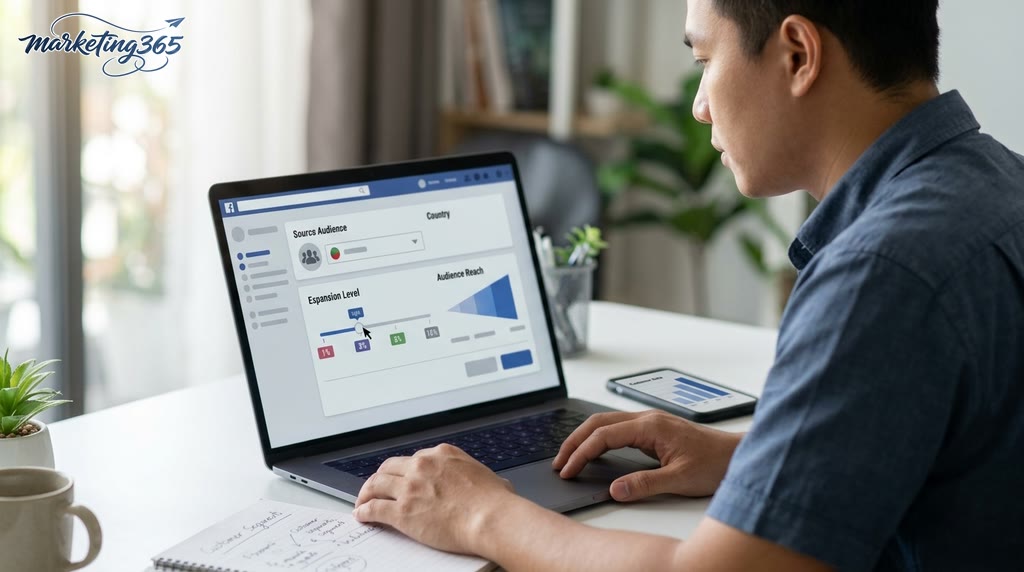
If you are just optimizing a lookalike audience for Facebook ads, start with 1% or 3% to read the response quickly. When the seed is strong enough and you need to expand, then try 5% or 10%. With lookalike percentage selection, do not choose a large level right away if you do not yet know whether the source is truly clean.
After choosing, check four points before saving: is the file name easy to recognize, is the source correct, is the country correct, and does the percentage match the campaign goal. If one of the four is wrong, the audience will still be created but will be difficult to use for optimization.
Which Data Source Should You Use for a Lookalike File?
The best data source for a lookalike file is one that reflects real value-driven behavior, such as buyers, leads who left their information, or a high-quality engaged group. If the seed only has many likes and comments but few conversions, the lookalike audience will often be broad but less aligned with the objective.
| Seed source | Best when | Signal level |
|---|---|---|
| Buyers | You want new customers likely to purchase | Highest |
| Customer email/phone list | You have a clean old customer list | High |
| People who submitted forms/filled leads | You want to expand from clear intent | Quite high |
| Fanpage engagers | Purchase file is too small, need a supplement | Medium |
| People who only like/comment | Only for secondary testing | Low |

When choosing a source, prioritize in this order: buyers > leads > high-quality engagers > surface-level engagement. A clean seed of 200 buyers is often more useful than 5,000 casual interactions.
When Should You Prioritize Buyers Over People Who Only Engage?
Buyers are the most important seed source when the goal is to find more people likely to convert. Purchase behavior gives a stronger signal than likes, shares, or comments because it reflects willingness to pay.
If the purchase file is still small, you can add fanpage engagers, but choose only high-quality groups: people who watched videos for a long time, sent messages, clicked on products, or filled out forms. When building a lookalike from old customers, do not put every engagement type into one bucket.
A quick check is to compare output quality: at the same lookalike percentage, keep the audience that generates more add-to-cart events, leads, or purchases.
Should You Create Multiple Lookalike Files From Different Sources?
Yes, if each source serves a different goal and you track the results separately. How to build the right lookalike customer file works better when you test multiple seeds: one file from buyers, one from customer email addresses, and one from fanpage engagers.
Do not combine different sources carelessly if the original behaviors are too far apart. For example, a file from buyers is usually better for conversion optimization, while a file from surface-level engagement is more suitable for awareness expansion.
When testing multiple lookalike files, clearly note the seed source, creation date, percentage, and the campaign being used. That way, you know which file to keep and which one to remove.
How to Run and Optimize Lookalike Audiences for More Stable Sales
A lookalike audience only produces stable sales when you assign it the right role, test it in a controlled way, and optimize based on real campaign signals. With how to build the right lookalike customer file, the goal is not to go broad immediately, but to find a group that responds better and then maintain delivery with the right creative, budget, and optimization objective.
How Should You Combine Lookalike With Remarketing and Cold Audiences?
Lookalike should sit in the new-customer layer, while remarketing is used to bring back people who have viewed, added to cart, or engaged. When running Facebook ads with lookalike audiences, separate each group clearly so you can read the data cleanly, especially when testing multiple lookalike customer files for Facebook ads at the same time.
| Audience group | Role | When to use |
|---|---|---|
| Lookalike audience | Find new customers | When you need to scale |
| Cold audience | Test initial response | When testing messaging and audience |
| Remarketing | Close people who already showed interest | When you want to increase conversion rate |
A manageable structure is to keep lookalike for prospecting, run remarketing separately, and avoid mixing the two in the same ad set if you are still testing the lookalike audience. This helps you know whether the problem is the audience, the creative, or the landing page.

When Do You Need A/B Testing and What Should You Test?
A/B testing is needed when an audience is spending steadily but sales are unstable, or when you want to compare different seed sources. How to create a lookalike audience in Facebook Ads will be more effective if you test only one main variable at a time, instead of changing the seed source, audience percentage, and ad creative all at once.
Testing checklist should follow this order:
- Test seed source: buyers, fanpage engagers, form submitters.
- Test percentage: keep one level fixed and compare it with another.
- Test creative: same audience, different message, image, CTA.
- Test ad sets: keep budgets close so results are readable.
A common mistake is overlapping tests, which makes it impossible to know whether the result came from the audience or the ad. If an audience becomes more expensive, CTR drops, or lead quality weakens after a few days, keep the old structure, change only one variable, and monitor 2–3 delivery cycles before expanding.
Mistakes That Prevent You From Creating a Lookalike Customer File
Failure to create a lookalike customer file usually starts with the source data, then moves to file format, audience size, wrong region selection, weak pixel signals, and account access permissions. If you check in this order, you can isolate the problem faster instead of fixing things at random.
Check the Source File, Access Rights, and Data Signals First
The error in creating a lookalike customer file is often in the source file or access rights, not in the audience creation step. If the source is a customer data file, open it and check three things: correct CSV/XLSX format, enough identifying columns such as email or phone number, and not too many duplicates. For sources from Facebook Pixel or the fanpage, make sure the pixel has recorded enough events and the account has the proper ad management permissions.
Quick fix checklist:
- Does the file match the required system template?
- Are any data columns blank, encoded incorrectly, or missing key information?
- Has Facebook Pixel been placed on the correct landing page and recorded recent signals?
- Do you have enough ad management permissions to create and use the audience?
- Are the fanpage, pixel, or customer list in the correct account?
If the file is clean but still fails, the signal is usually too weak. A source with very little engagement or old data can make lookalike creation slow, or even prevent you from creating a lookalike customer file from phone numbers or customer email addresses as expected.

When Should You Refresh the Seed File Instead of Fixing the Lookalike File?
You should refresh the seed audience when the original file is too small, too old, or mixed with too much low-quality data. In that case, the problem is the input source, not how to create a lookalike audience in Facebook Ads.
Signs that the seed file needs to be rebuilt:
- The file is old and no longer reflects recent buyers.
- The list contains too many junk leads, people who never bought, or duplicate data.
- The pixel source has too few events and not enough signal to create a lookalike audience from Facebook Pixel.
- The more you adjust the lookalike percentage, the more distorted the result becomes, but the seed file still has not been cleaned.
When you see these signs, refresh the source first and then create the lookalike audience again. Building a lookalike from old customers only works when the seed audience is clean enough, recent enough, and large enough.
Key Notes for Using Lookalike Without Diluting Performance
Lookalike only works when you tightly control seed quality, audience breadth, frequency, and signs of creative fatigue. When scaling too quickly, Facebook lookalike audiences can become diluted, causing costs to rise and Facebook ad performance to fall even though budget keeps flowing in.

Signs That a Lookalike Audience Is Getting Weaker
A lookalike audience is getting weaker when ad signals clearly deteriorate in Ads Manager and at both the top and bottom of the funnel. With the same ad creative, CTR declines over time, CPM or cost per result rises, responses get worse, and the audience starts to dry up after a few delivery cycles.
- CTR drops while impressions keep rising: usually a sign of creative fatigue or the audience reaching its limit.
- Frequency rises quickly: users are seeing the ad too many times in a short period.
- Comments, messages, and clicks are no longer steady: traffic quality is becoming diluted.
- A 1% audience has been running for a long time but cannot expand into new groups: a sign that the seed or delivery is weakening.
A common case is keeping the same ad creative for too long and only increasing the budget. In that situation, how to build the right lookalike customer file is still correct, but Facebook ad performance no longer looks like the early stage because the problem is in the creative and the input data, not only in the audience.
What Should You Do Before Increasing Budget?
Before scaling Facebook ads, check the seed again, try a different percentage, change the creative, and separate ad groups by objective. This is a much safer order than increasing budget as soon as the results look only moderately good.
- Review the seed: prioritize quality data such as buyers, real leads, or valuable engagers; avoid seed that is too dirty or too broad.
- Test another percentage: keep one stable group with a small audience while trying a broader group to see how much performance drops.
- Change the creative before adding more money: if CTR falls, test a new creative before concluding the audience is the issue.
- Separate ad groups: do not put every audience into one ad set if you want to optimize budget and read signals accurately.
The most important notes for using lookalike are to keep scaling at a moderate pace, monitor frequency, and stop expanding when signals start to worsen instead of waiting until costs get out of control.
Frequently Asked Questions About Building the Right Lookalike Customer File
This FAQ section gives quick answers to the most common issues in how to build the right lookalike customer file: how large the seed file should be, whether CRM files or purchased lists can be used, and why ads can still underperform even when the setup is correct. Each answer should be used as a checkpoint before spending budget.
How Many People Does a Lookalike File Need to Be Created?
A lookalike file should be based on a seed audience with enough signal; do not use too little data just because you want to create it quickly. If the seed is too small or too diluted, the system will struggle to learn the right behavior, so it is better to accumulate more quality than to force a number.
- Check whether the file contains enough people with similar buying behavior, engagement, or order value.
- If the source is still thin, add more from buyers, people who left information, or deeply engaged users.
- With how to build the right lookalike customer file, the quality of the original data is often more important than forcing a hard numerical threshold.
Can You Create a Lookalike From Purchased Marketplace Data or a CRM File?
Yes, if the CRM file or old customer list is clean, properly authorized, and mapped well enough to upload the customer file. Formatting errors, heavy duplication, or missing matching fields will make a lookalike from customer email addresses or phone numbers less accurate.

- Remove duplicates before uploading.
- Standardize phone number, email, domain, and country code formats if applicable.
- Use only valid data sources that you are allowed to process.
Why Is Performance Still Weak Even After the Setup Is Correct?
A correctly created lookalike audience can still underperform if the seed is weak, the targeting is too broad, the creative is not compelling enough, or the offer is unclear. For Facebook ad optimization, diagnose in this order: check the audience source again, review the lookalike percentage, then adjust the ad content and sales message.
- Weak seed: the original file has little signal and many people only engaged superficially.
- Creative mismatch: the image, copy, and angle do not fit the audience.
- Unclear offer: viewers do not see a reason to stop and act.
MARKETING365 📧 Email: lienhe@marketing365.vn 🌐 Website: https://marketing365.vn 👍 Fanpage: https://facebook.com/marketing365.official
For the latest official guidance, you can also refer to Google Ads Help.
You can also read more articles on the same topic in the Performance Ads section.



