
Contents
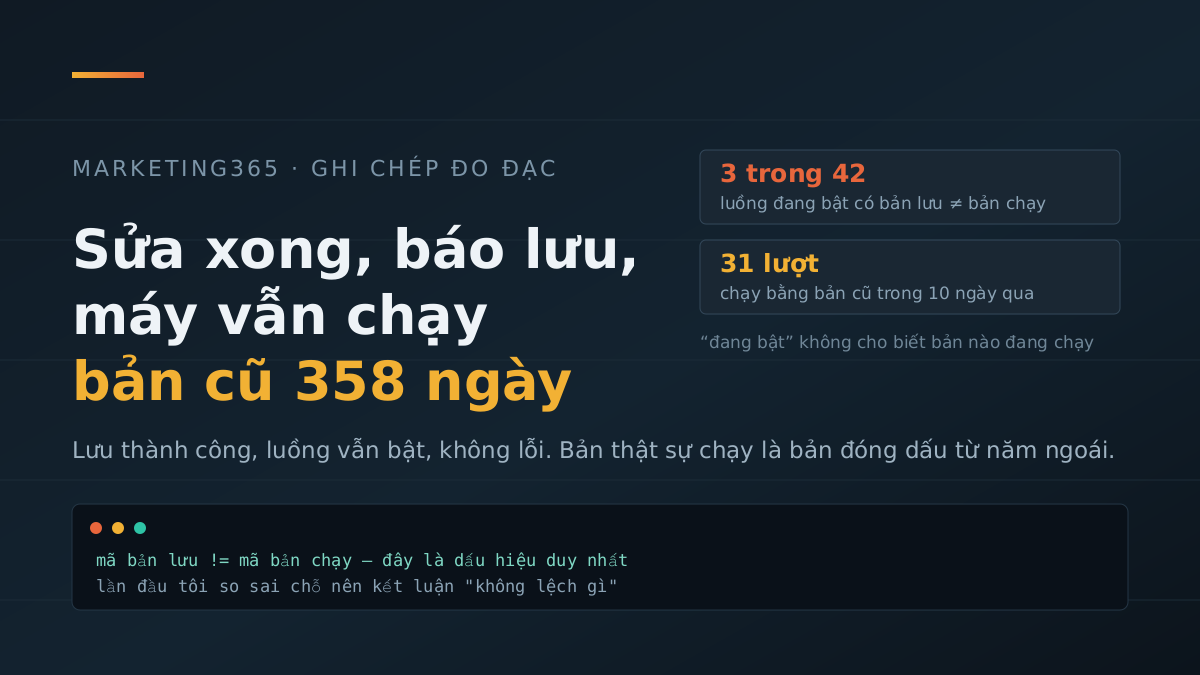
On 13/08/2026, I fixed two automated workflows that handle article translation into English. The tool said four changes had been applied, raised no warnings, and the workflows still showed as “on.” I shut the machine down. The next day, when I opened it again, both were still running exactly as they had before the fix.
Nothing was broken by the edit. It had been fixed and saved — the only problem was that what was running was not what I had just saved. On 14/08/2026, I rescanned all 211 workflows on the server to see where else this was happening. The results are below, along with the point where I drew the wrong conclusion halfway through.
“On” does not tell you which version is running
Where I went wrong was the word “on.” An automated workflow here has two separate layers of status:
- Saved version — what you see when you open the workflow. Whatever you edit and save lives here.
- Running version — the version stamped at the last activation. This is the one that actually fires when the time comes.
Editing and saving only affect the first layer. For the second layer to change, it has to be stamped again. The “on” flag only answers the question “is this workflow running?” It does not answer “which version is running?” All three mismatched workflows I found today were on, and all three were running normally.
The only clue is the two version IDs: the saved version ID and the running version ID. If they match, all is well; if they differ, what is running is not what was just edited.
saved version ID:  d9a94efb-...
running version ID: 22acd26e-...   ← mismatch
Scanning all 211 workflows: three were out of sync
This server has 211 workflows, of which 42 are on and 15 are archived. I pulled each workflow and compared the two version IDs.
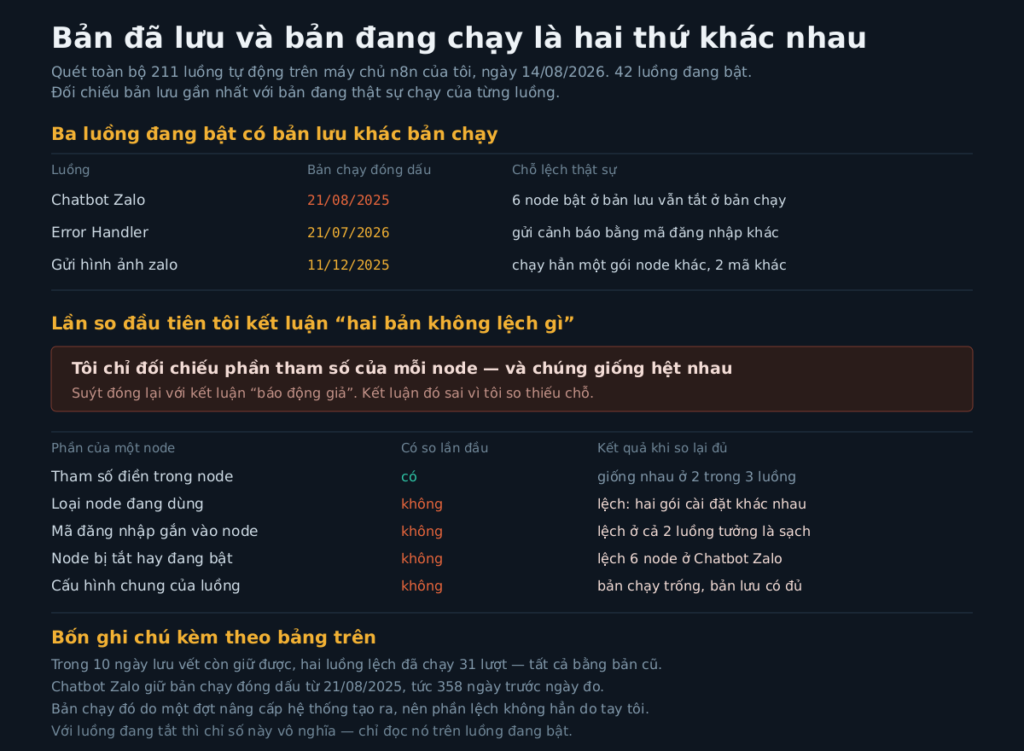
Three active workflows had a saved version that differed from the running version. For inactive workflows, that metric is meaningless — if it is off, there is no running version to compare — so I excluded them. The two English-translation workflows I fixed on 13/08 now matched, which means the re-stamping step that day did take effect.
I almost concluded that “two out of three were false alarms”
After finding the three mismatched workflows, I compared where they differed. My method was to take each node from the saved version, find the node with the same name in the running version, and compare the filled-in parameters.
The result: two of the three workflows had identical parameters, the same number of nodes, and the same wiring. I was about to write in my notes that “the IDs differ but the content does not, so there is nothing to worry about.”
That conclusion was wrong. It was wrong not because the data was wrong, but because I had only compared one part of the node — the part that was easiest to extract. A node also carries other things: what type it is, which login credential it uses, whether it is on or off, and the workflow-wide configuration. I had not touched those parts.
When I compared everything properly, this is what came out:
- Error-reporting workflow: the saved version was tied to one login credential, while the running version was tied to another. That means the error alerts from the past few weeks were being sent through the path I thought I had already changed.
- Image-sending workflow: the message-receiving node in the saved version and the running version belonged to two different installation packages, plus two different login credentials.
- Chatbot workflow: the six nodes I had turned back on in the saved version were still off in the running version.
The shared configuration was even stranger: in both “clean” workflows, the running version had an entirely empty configuration section, while the saved version had everything filled in. If I had stopped at parameter comparison, I would have walked away with a spotless health report for a machine that was actually running the wrong setup.
This is exactly the kind of mistake I wrote about in three ways of counting late posts that all missed: pick one easy-to-grab trace and treat it as the whole picture.
How long this had been running without anyone noticing
The chatbot workflow was the longest-running case. Its running version was stamped on 21/08/2025 — 358 days before I measured it. Its latest saved version was dated 10/03/2026, which means that edit had sat there for 157 days without ever being applied.
To be fair: the running version of that workflow was created by a system upgrade, not by me pressing the stamp button. So that mismatch was not entirely my own operational mistake. The other two workflows did not have that excuse.
The execution logs on this machine only keep about 10 days, so I could not count back any further. Within those 10 days, the two mismatched workflows ran 31 times — the error-reporting workflow 20 times, the chatbot workflow 11 times. None of those runs produced an error. They all ran on the old version.
That is the most frustrating part of this kind of failure: it creates no symptoms. The workflow still fires on time, still produces output, still looks green. It just produces output from the old version.
The check takes thirty seconds
No special tool is needed. Pull the workflow details, compare the two version-ID fields. If they match, stop. If they differ, stamp it again and compare once more to be sure.
1. fetch workflow details  → compare saved version ID with running version ID
2. mismatch → stamp again (publish)
3. fetch again             → the two IDs must match
Step 3 is the step I usually skip, and it is the only step that proves the fix has actually taken effect. On 13/08 I did all three steps for the two English-translation workflows, and when I checked again today, both still matched — so this holds over time, not just by coincidence once.
Three things I took away from this
- In a system with multiple “saved” layers, “saved successfully” does not mean “running.” You have to find the field that refers to the running version, and read that field correctly.
- A success message from the tool is weak evidence. It only says the command was accepted, not that the result reached where it needed to go.
- When comparing two things to conclude they are “the same,” check whether you have left anything out. This time I compared only part of the node and almost declared the whole machine clean.
I have not re-stamped those three workflows while writing this article. The two Zalo workflows are old and no longer used for the site, while the error-reporting workflow needs the correct login credential checked again before I apply it — applying the wrong one would silence the error alerts, and that is worse than the old version. It is the same family of problem as finishing a file for AI to read and nobody opening it: if you do it and do not verify it, it is as if you never did it.



