
Contents
- An afternoon of optimization for just 17% less data
- The real pixel math: 329px times 2.75 DPR
- The srcset ladder trap: there is no stop between 768 and 1024
- The Vary: Accept header — what makes everything look like it worked
- Five WebP files across 11 gigabytes of real images
- Three days later: 88,598 files had once been real, then disappeared at 15:18
- Pressing the button: 96,322 files in three hours and fifteen minutes
- Three lessons after pressing bulk convert
On 01/08, I spent an entire afternoon fixing the sizes attribute across all article images on marketing365.vn. The goal was clear: the content frame on mobile screens was only 329 pixels wide, but the browser was downloading a 1170-pixel image weighing more than 106 kilobytes. I wanted to force it to load a smaller version to reduce bandwidth.
Fourteen days later, when I used a headless browser to measure the actual request byte by byte, I realized two things: first, that optimization only delivered a 17% reduction in file size because it ran into the pixel-density ceiling; second, right under my feet, a lever more than three times larger was already enabled but had been dead for two months without anyone noticing.
An afternoon of optimization for just 17% less data
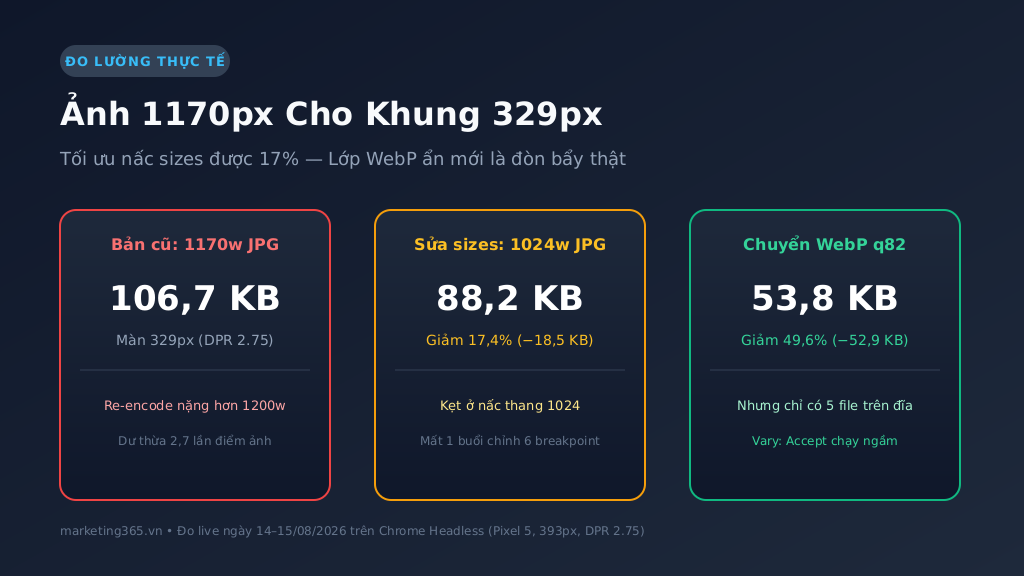
The original problem looked very convincing: the article content column on mobile had a measured layout width of exactly 329 pixels. Yet the theme’s HTML source was outputting a generic sizes attribute, causing the browser to choose the 1170w step (106,747 bytes). Looking at that, anyone would think loading a 1170px image for a 329px frame was a shocking waste.
I rewrote the wp_calculate_image_sizes filter in the child theme, clearly separating featured images (calculated by the actual viewport ratio) from in-content images (using sizes="auto" combined with lazy loading). I cleared the page cache, reran the queue, and checked: the mobile browser had agreed to switch the load step from 1170w down to 1024w.
File size dropped from 106,747 bytes to 88,213 bytes — a savings of about 18.5 KB, or 17.4%. That is a real number. But to get that 17%, I spent hours adjusting 6 CSS breakpoints and deleting thousands of cached pages.
The real pixel math: 329px times 2.75 DPR
The reason the sizes patch could not push file size down any further lies in the concept of Device Pixel Ratio (DPR). A phone screen today does not render 1 CSS pixel as 1 physical light dot.
When I ran Chrome Headless emulating a Pixel 5 (393px screen, DPR 2.75), the calculation the browser performed in an instant was:
329px (layout frame) × 2.75 (DPR) = 904.75 physical pixelsThe mobile browser is smarter than we think: it knows that if it loads a 329px or 768px image, the image will look blurry on a retina screen. To keep the image sharp, it has to find an image that is at least 905 pixels wide.
The srcset ladder trap: there is no stop between 768 and 1024
The default WordPress and theme image-size ladder jumps: 150w → 300w → 768w → 1024w → 1170w → 1200w. When the browser demands an image file about 905px wide, it looks at the srcset list and sees that 768w is too small (it would be blurry), so it has no choice but to jump straight to the 1024w step.
Even if I declared the sizes attribute down to the last pixel, as long as the system had not generated a separate crop at around 900w, the browser would still load the 1024w version. The 1024w file weighs 88 KB, and that is the floor imposed by the JPEG format.
Not to mention a darkly funny detail I found when comparing file sizes: the 1170w version (106,747 B) was actually heavier than the original 1200w version (105,849 B) because of the image library’s re-encoding algorithm. The maximum-size cap at 1170w set in July had, in fact, locked onto the heaviest file in the entire scale.
The Vary: Accept header — what makes everything look like it worked
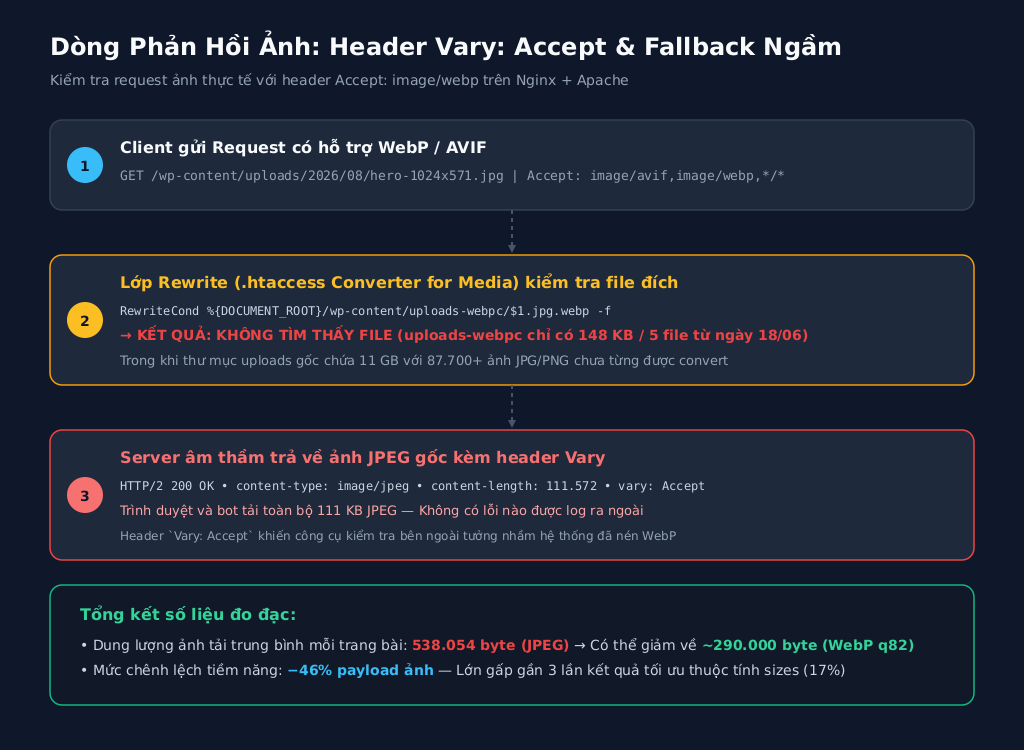
While the physical-size lever hit a 17% ceiling, the modern compression-format lever (WebP) had been left in the dark. The Converter for Media plugin had been installed and activated since mid-June. When I used curl to send a test request for any image URL:
curl -sI -H "Accept: image/webp,*/*" https://marketing365.vn/wp-content/uploads/2026/08/sample-1024x571.jpg | grep -i vary
vary: Accept
The vary: Accept header appeared properly. Any external automated checker looking only at that header would mark a green check: “The site supports dynamic WebP compression.” But that is a dangerous cognitive trap.
The rewrite rule in the .htaccess file checks whether the target file exists: RewriteCond ... $1.jpg.webp -f. If the server cannot find the corresponding .webp file on disk, the rewrite rule is automatically skipped and the web server returns the original .jpg file without reporting any error. The Vary: Accept header only means “this response may change depending on the browser,” not “you received a WebP file.”
Five WebP files across 11 gigabytes of real images
On 15/08/2026, I went straight to the server disk to count the actual files. The cross-checking result startled me:
- The original image folder
wp-content/uploads: weighing 11 Gigabytes with more than 87,700 JPG and PNG image files. - The compressed image folder
wp-content/uploads-webpc: weighing only 148 Kilobytes, containing exactly 5 .webp files generated on 18/06/2026 from an initial test image. - Database option:
webpc_is_new_installation = 1, meaning the plugin still considered itself freshly installed. I read that line as “no one has ever pressed the compress button” — and that was where I was completely wrong, something I would not realize until three days later.
An average article page is currently loading as much as 538,054 bytes of JPEG images for a small mobile reading column. When I took 4 images currently being served and compressed them experimentally with ffmpeg libwebp (q82), file size immediately dropped by 34% to 49.6% at the same display size, with no visible quality loss to the naked eye.
Three days later: 88,598 files had once been real, then disappeared at 15:18
On 18/08, I reopened my own operations log to prepare this article and found a line dated 08/08: the compression batch had finished, 88,598 WebP files, folder size 4.81 GB, external serving check passed. The two records collided head-on: 08/08 had 88,598 files, 15/08 had 5 files. One of them had to be wrong, and I believed the older record was the fabricated one.
What settled it was not memory but the folder modification timestamp on disk. Deleting files inside a folder changes its mtime:
wp-content/cache          2026-08-11 08:18 UTC
wp-content/uploads-webpc  2026-08-11 08:19 UTC   (= 15:19 Vietnam time)
  └── uploads/            2026-08-11 08:20 UTC
The compression batch had not never run. It had run, survived for three days, and then been wiped out sometime between 15:18 and 15:20 on 11/08. Three accompanying clues narrowed down the culprit: the recreated folder afterward belonged to root:root rather than www-data, meaning the deletion process ran with server-admin privileges rather than through the browser; at the same time, the webpc_settings option was removed from the database; and the entire compression configuration returned to default. The server access logs for that time window had already rotated away, and the automatic backup only kept data from 12/08 — meaning it captured the scene after everything had disappeared. I could not identify the exact action that triggered it, and I recorded it that way instead of choosing a more convenient-sounding culprit.
Pressing the button: 96,322 files in three hours and fifteen minutes
On the afternoon of 18/08 I rebuilt the compression layer from scratch. The four-step sequence had its own reason for each step: disable the second compression plugin that had been activated between the two dates above (two plugins overwriting the same image-serving layer is a recipe for breakage); write 21 configuration keys back into the database so the admin interface and the new-image-upload compression mechanism would work again; restore folder ownership to www-data; and only then run the batch.
The ownership fix was the easiest step to miss, and without it everything stops. A folder recreated by the admin process belongs to root, while the compression process runs under the web server account, so every file reports “failed to create destination directory” without saying why:
chown -R www-data:www-data wp-content/uploads-webpcThe main batch ran from 16:00 to 19:15 Vietnam time, processing in groups of 40 files and yielding CPU to the web process: 96,322/96,322 files, zero errors. The second cleanup pass caught 146 leftover files. The final result on disk was 96,190 WebP files, totaling 5.5 GB. The 143 files that did not generate WebP may look like an error at first glance, but they were actually by design: the keep only the smaller version option skips images for which the WebP version is still larger than the original — the 08/08 batch also left 133 such files behind.
For acceptance, I did not read the number reported by the plugin, because that number is meaningless: the internal counter accumulates across every run and prints more than 115 million. What matters is counting files on disk and asking the server directly with the exact header the browser sends:
curl -sI -H "Accept: image/webp,*/*" <image url> | grep -i content-type
content-type: image/webp
Four samples taken from four different months (03, 06, 07, and 08 of 2026) all returned image/webp, lighter than the original JPEG by 33% to 73%. No page cache needed to be cleared: the compression layer works at the server level and the image URL stays the same, so cached pages automatically pick up the lighter version.
Three lessons after pressing bulk convert
This incident taught me three expensive lessons about website performance optimization:
- Do not trust the returned header until you have seen the physical file: An HTTP 200 response with
Vary: AcceptorContent-Typecan hide a silent fallback mechanism inside the web server. Always check the payload size (Content-Length) or count files on disk. - Choose the biggest lever first before polishing small details: Trying to squeeze every last pixel out of the
sizesattribute only delivered a 17% improvement, while a modern image-format conversion command delivered a 33–73% reduction across the entire image library. - Past state is not proof of the present: The record “88,598 files compressed successfully” was completely true on the day it was written, and completely useless three days later. An optimization layer can disappear without making a sound — no warning, no error, no change in return code. The only way to answer “does the site serve WebP” is to ask the server at that exact moment with the same header the browser sends, not to reopen an old log.
Just like 11 days of fixing the wrong thing because I trusted the wrong LCP label or the story of cutting 80% of CSS files without LCP moving at all: what we think is working perfectly in theory is often the thing standing still in silence in practice.
Processing nearly one hundred thousand images on a live server is a CPU- and disk-intensive task, so the compression batch ran in small chunks, yielded resources to readers’ browsers, and had someone watching it from start to finish. Three hours and fifteen minutes for 96,322 files, with zero errors. What I took away from this incident was not the 5.5 GB figure, but a new habit: once a week, send exactly one curl line with the Accept header to any image and look at the returned content-type line. It takes two seconds, and it catches what three days of my own monitoring systems failed to see.



