

Contents
- Why fanpages easily miss messages
- How to check and organize your fanpage inbox so you don’t miss customers
- Set up labels, notes, and priorities to classify customers correctly
- Set up auto-replies and quick responses in the right places
- How to manage multiple fanpages and messages at the same time
- When to consider support software instead of manual handling
- Common mistakes that keep fanpage inboxes from being managed properly
- Frequently asked questions about how to manage a fanpage without missing messages
When customer messages pile up on a fanpage and get buried, it becomes very easy to miss orders, reply slowly, and disrupt the workflow when multiple people are responding at once. How to manage a fanpage without missing messages means checking exactly where the inbox is, assigning clear ownership, and organizing the reply process from the moment a customer sends a message. This content is for fanpage admins, small shops, and marketers handling messages manually or just starting with Meta Business Suite. The goal is to help you identify bottlenecks, improve fanpage message management, and reduce inbox loss on your fanpage in real practice.
Why fanpages easily miss messages
How to manage a fanpage without missing messages starts with understanding the real causes of lost inbox messages. When a fanpage has multiple people replying, no clear labels, or missed pending inbox items, messages can slip through even if the volume is not that high.
Signs your fanpage is losing control of its inbox
A fanpage is losing control of its inbox when customers send messages but replies come late or not at all. Another sign is when messages sit among pending requests, causing admins to open them and then forget them again.
Sellers often notice the problem through very specific situations: customers ask again and again, a conversation is left hanging for too long, or two people reply to the same customer but no one knows who has handled what. If you use the messenger fanpage inbox every day and still have to dig through each chat thread, that is a clear sign messages are being missed.
Quick checklist:
- Are there customers who messaged in the morning but you only saw it in the afternoon?
- Are there conversations forgotten after the customer asked for pricing?
- Are important messages mixed in with pending requests?
- Are there cases where the person in charge does not know who is replying?
Common reasons inbox messages get lost
Lost inbox messages usually come from an unclear fanpage inbox handling process rather than from message volume. When responsibilities are not assigned specifically, everyone can reply, but no one takes final ownership.
Another reason is not having someone monitor the inbox on a fixed schedule. Just a few hours away during peak time can push new messages down the list and make customers easy to miss.
In addition, managing multiple fanpages and messages at the same time without bringing them into one central place makes it easy for admins to lose track of conversations. Not setting rules for labels, not marking important messages, or using too many parallel communication channels also makes how to manage a fanpage without missing messages harder to do effectively.
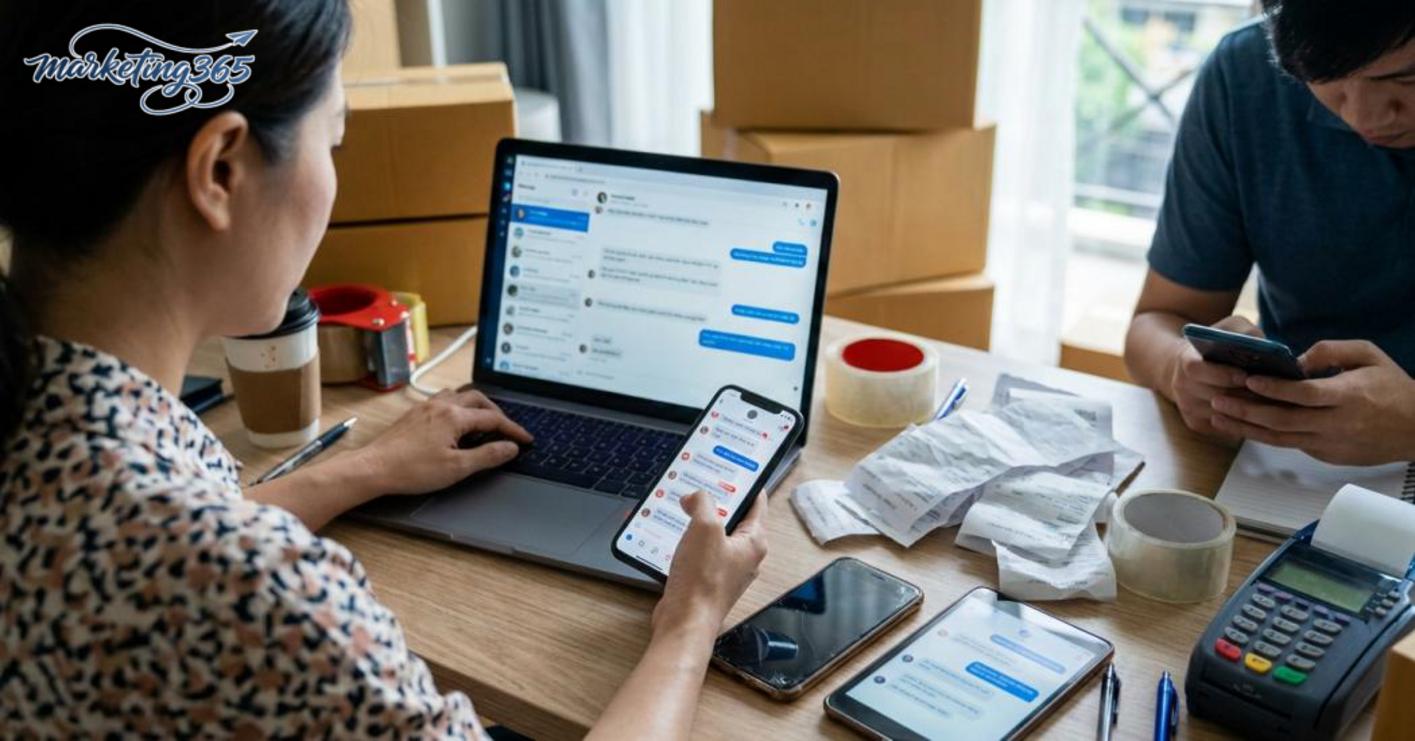
To fix the problem properly, you need to view the inbox as a workflow with input, handler, and clear status. If one of those three parts is missing, messages can easily slip through even when someone is on duty.
How to check and organize your fanpage inbox so you don’t miss customers
How to manage a fanpage without missing messages starts with checking each inbox section correctly and assigning clear ownership. Following this order helps you quickly spot hidden messages, avoid missing new customers, and reduce duplicate replies when multiple admins are on duty.
Check each inbox section in priority order
The most effective way to check a fanpage inbox is to open each section in a fixed order so no conversation is overlooked. In Meta Business Suite, go to Inbox and check in sequence: Unread, Message Requests, Spam, Saved, and any labeled conversations if your team uses labels.

This order helps you handle urgent customers first. For example, a cosmetics shop may receive 20 to 30 messages between 9:00 and 11:00 a.m. If you only look at Unread, you may miss new customers in Message Requests or older customers saved with labels from the previous shift.
Quick check checklist:
- Open Unread to handle new customers first.
- Open Message Requests to see customers who are not yet connected.
- Check Spam if the page has ever been harassed or receives many strange messages.
- Review Saved and internal labels to find unfinished conversations.
- Cross-check the previous shift’s handler if the page has multiple admins.
If the team has a clear handling convention, you only need to look at the status to know which messages are waiting for a reply. This is the fastest way to manage a fanpage without missing messages when inbox volume suddenly increases.
Organize the inbox workflow by person in charge
The fanpage inbox workflow needs one primary owner for each conversation and a short handoff status. When 2 to 5 admins are replying, simply not recording who is handling the chat can easily lead to two different answers or a customer being forgotten after a quote is sent.
A simple and easy-to-apply structure:
- Split by shifts: 8:00–12:00, 12:00–17:00, 17:00–22:00.
- Split by task type: pricing, order closing, complaints, returning customers.
- Use clear statuses: newly received, waiting for response, quoted, transferred to another department, completed.
For example, a conversation asking about size and price should be assigned to one person from start to finish. If the customer needs stock availability, the handler only needs to note “quoted, waiting for customer confirmation” and then update the status. This reduces missed messages when shifts change at the end of the day.
Each time you finish reading a conversation, do three things immediately: add a label, record the status, and tag the next responsible person if needed. In Meta Business Suite, this should be done within one minute of reading so the team does not lose track of the conversation. That way, the fanpage keeps a stable response rhythm and reduces the chance of missing customers who are ready to buy.
Set up labels, notes, and priorities to classify customers correctly
Setting up labels, notes, and priorities is how to manage a fanpage without missing messages when inbox volume rises quickly, because you can tell at a glance whether a conversation needs immediate action or can be followed up later. The most effective approach is to use a small but clear set of labels, short notes, and one consistent priority rule for the whole team.
Which criteria should you label first
You should label first by level of interest and buying stage, because these two groups help the team decide the next step very quickly. A compact label set usually only needs 5–7 groups: New customer, Returning customer, Asking for price, Considering, Need to call back, Complaint, Closed deal. If you sell multiple product lines, add labels by product group afterward to avoid making the list too long and hard to remember.
The 3-step method:
- Finalize the minimum label set for the fanpage, prioritizing statuses with clear actions such as Asking for price, Need to call back, and Closed deal.
- Assign one main label per conversation, and only add secondary labels when tracking is truly needed.
- At the end of each shift, review high-priority labels such as Complaint and Need to call back so no customer is missed.
Read more: How to Use TikTok Hashtags to Go Viral
A simple example: if a customer messages “Do you still have black?” label it Asking for price; if they leave a phone number and ask for advice after 7 p.m., label it Need to call back; if they complain about a missing item, label it Complaint so it moves to the top of the queue. If a message is both from a returning customer and a closing deal, prioritize the label based on the action to be handled first, not the customer identity.

How to use notes and priorities so you don’t forget customers
Short notes are a way to mark the handling status directly in the conversation so anyone on shift knows what needs to happen next. Each note should have 3 parts: what the customer needs, when to follow up, and the current status. For example: “Waiting for quote, message again tomorrow afternoon” or “Sample sent, waiting for size confirmation.”
The priority rule should follow 4 steps:
- Messages with a specific time commitment should be labeled Need to call back immediately.
- Messages that have been answered but have not received a response after one follow-up should be moved to Waiting for response.
- Messages with a phone number, a request for a quick close, or repeated pricing questions should be moved to the priority handling group.
- At the end of the day, one person in charge should review all priority labels and hand off the right tasks to the next shift.
A practical example that is easy to control is a small fanpage with one admin and one order closer. The admin only needs to look at the label list to know which messages must be answered within 15 minutes and which can wait until the next morning. When the rules are clear, how to manage a fanpage without missing messages becomes more stable because each label leads to a specific action.
Set up auto-replies and quick responses in the right places
Auto-replies help confirm receipt of a message, route questions, and keep customers engaged while waiting for a human response. With how to manage a fanpage without missing messages, the goal of auto-reply is to reduce the gap at the start of the conversation, not to replace the admin.
When should you use auto-replies
Automatic replies are suitable when a fanpage needs to keep response times steady outside working hours or during sudden inbox spikes. A shop often uses them to confirm receipt, ask about the customer’s initial need, and then hand the conversation to a human during working hours. If you turn on automation for everything, customers will get rigid replies and may leave.

It should be enabled in 4 clear situations:
- Outside working hours, so customers know their message has not been forgotten.
- When message volume rises quickly, to reduce the chance of new messages being pushed down.
- When you need to filter needs, for example asking whether the customer wants a quote, consultation, or appointment.
- When you need to show fanpage message response time more clearly during the waiting period.
Do not overuse it when the conversation needs immediate handling, such as urgent complaints, order closing that needs quick confirmation, or a customer who has already been speaking at length with the assigned staff member. In those cases, auto-reply should only be the first layer.
What should an auto-reply include
The most effective auto-reply is short, clear, and points to the next step. A good template usually includes a greeting, a response-time commitment, a request for more information, and a few quick questions to classify the need. This helps keep page message management cleaner because the handler gets context from the start.
The structure should include:
- Short greeting: confirm the fanpage has received the message.
- Time commitment: state when a human will respond.
- Information request: name, need, order code, area, or screenshot.
- Quick question: let customers choose 1 of 3 common needs by replying.
For example, the sentence “We have received your message, please leave your main request so we can assist you faster” usually works better than a text that is too long or too mechanical. When setting up auto-replies on a fanpage, keep only enough content for customers to understand the next step. If needed, you can combine it with a chatbox assistant, but a human should still review important messages, especially when customers ask for details or show signs of being ready to buy.
How to manage multiple fanpages and messages at the same time
Managing multiple fanpages and messages at the same time means bringing all inbox flows into one place, assigning clear ownership, and handling them according to a unified priority rule. If each page is handled differently, messages can easily be missed, replied to twice, or left unanswered when they are hot leads.
A clean approach is to split by page or product group, set shifts for each time block, and use shared reply templates for repeated situations. When you need to monitor many pages every day, many teams choose a Facebook sales management tool or a shared inbox to reduce dependence on individual memory and avoid opening too many tabs at once.
When does a small fanpage still need centralized management
A small fanpage still needs centralized management when inbox messages start coming in from multiple sources and one person can no longer remember every old conversation. Clear signs include multiple people messaging about the same promotion at once, customers asking from ads and old comments, or forgetting a customer’s status by the afternoon after replying in the morning.
Once inbox overload begins, relying on memory often fails in small but important ways: forgetting a follow-up time, replying to the wrong person who already closed, or missing a customer who needs a quote. At that point, you should switch to centralized management so every message has one shared place to track it, instead of each person keeping a different version in their head.

Rules for staying consistent when multiple people reply
The fanpage inbox workflow must have shared reply templates, clear status tags, and specific handoff rules to avoid inconsistent responses. If one person edits the content too much or ignores the customer context, the experience will immediately feel different across chats.
Minimum checklist:
- Use one set of replies for greetings, pricing, asking for phone numbers, and closing orders.
- Standardize tags such as new message, consulting, waiting for response, closed.
- Hand off by shift using short notes: what the customer needs, what has been sent, what is still missing.
- Do not change the content on your own unless you have reread the chat history.
When applying how to manage a fanpage without missing messages, the key is to keep one unified workflow, not depend on who happens to be online.
When to consider support software instead of manual handling
Support software should be considered when how to manage a fanpage without missing messages manually starts becoming slower than the speed of incoming messages and you can no longer keep customer history under control. At that point, a tool helps bring inboxes into one place, reduce missed messages, and keep the process more stable than manual handling.
Read more: How to Make Facebook Reels Videos the Right Way

Signs it’s time to switch to a support tool
A fanpage should switch to a tool when operational signs are already clear, not just because automation seems convenient. If one inbox handler always has new messages piling up, multiple admins reply to the same customer, or customers ask again because replies are slow, manual handling is starting to create risk.
Common thresholds include:
- Inbox volume grows faster than the team can read and reply during a shift.
- You need permissions to separate consultants, order closers, and post-sale follow-up staff.
- You need reminders, labels, and conversation history so you do not have to ask from the beginning again.
- You need centralized management of many conversations instead of opening many tabs and relying on memory.
If you are manually reviewing every chat to avoid missing customers, then fanpage message management software that prevents missed customers will be a better fit than scattered notes on paper or in Excel.
Criteria for choosing the right tool for your fanpage
The right tool is one that makes the workflow simpler, not one that forces admins to relearn operations from scratch. For a sales fanpage, prioritize an easy-to-use solution with permissions, labels, conversation notes, and customer history tracking.
When evaluating, compare based on these criteria:
- It has centralized management so one customer is not answered inconsistently by two people.
- It has labels and notes to quickly filter new customers, quote requests, and closed deals.
- It has a supporting chatbox or auto-replies for repeated questions such as working hours, shipping fees, and order status.
- It can work alongside Facebook sales management software if your process needs to connect inboxes with orders, handling status, and post-sale care.
- It does not create extra confusion for new admins; the fewer steps, the better.
If your team is still small, choose a tool with just enough features first, then expand as needed. The most effective way to manage a fanpage without missing messages is usually to choose the right level of support, not the most feature-rich system.
Common mistakes that keep fanpage inboxes from being managed properly
Fanpage inboxes often keep getting missed because old operating habits repeat, even after support tools are in place. When a page already has a process but still misses customers, the usual reasons are not checking the inbox daily, not updating labels, not assigning a clear owner, or replying without reviewing previous responses. To keep how to manage a fanpage without missing messages working, fix these issues first before thinking about a new tool.
Operational mistakes to eliminate immediately
These are the mistakes that make page message management messier and keep inboxes from being handled properly:

- Leaving messages waiting too long before handling them, especially during peak hours.
- Not assigning one owner for each shift, causing customers to be passed around.
- Replying without context because you did not reread the previous 1–2 messages.
- Forgetting to update the status after quoting, scheduling a callback, or closing the deal.
- Using too many similar reply templates, making it hard to identify customers who still need follow-up.
The fix should be done immediately: check the inbox on a fixed schedule, label messages as soon as they arrive, assign clear ownership, and reopen the chat history before replying. With a method to avoid inbox loss on a fanpage, discipline matters more than the number of templates. If the page only changes the surface and not these habits, inboxes will still be missed.
Frequently asked questions about how to manage a fanpage without missing messages
The FAQs below help quickly clarify when to use tools and how to handle inboxes with a minimum process. For a small fanpage, the goal is to avoid missing customers, keep messages from waiting too long, and always have someone responsible for replying.

Does a small fanpage need message management software?
A small fanpage only needs fanpage message management software when inbox volume grows quickly, multiple people are handling replies, or customers often message outside working hours. If you only get 5–10 messages a day and one person can reply on their own, manual handling is still enough. When you start forgetting labels, replying more than 1 hour late, or not knowing who handled a message, that is when you should use a tool.
What is the simplest way to avoid missing inbox messages on a fanpage?
How to manage a fanpage without missing messages is simplest when you follow 3 clear steps.
- Assign one main inbox handler for each time block, for example 8:00–12:00 and 13:30–17:30.
- Label messages as soon as they arrive, such as “new customer,” “quoted,” or “need to call back,” so they do not get mixed into the waiting flow.
- Turn on auto-reply for incoming messages using Meta Business Suite or the inbox automation in the tool you use, so customers know their message has been received.
If the fanpage has many repeated questions, standardize 3 quick reply templates for pricing, delivery time, and return policy. When someone is absent, hand off the unfinished messages at the end of the shift so they do not carry over to the next day.
For official and up-to-date guidance, you can also refer to Meta for Business.
Related articles
- Build a Personal Brand on Linkedin
- Build a Personal Brand on Linkedin
- How to Create Viral Content on Social Media
You can find more practical marketing guides at https://marketing365.vn.
Content from marketing365 is created for SMEs, online shop owners, and new marketers.
You can read more articles on the same topic in the Social Media category.



