

Contents
- New Shopee sellers need to understand the basics before starting
- How to create a shop and set up a Shopee store correctly from the start
- How to list products on Shopee so they are more likely to get orders
- Order processing, packing, and shipping to avoid operational errors
- What to do so a new shop doesn’t just get “posted and left there”
- Common mistakes beginners make when selling on Shopee
- When should beginners do it themselves, and when should they seek professional support?
- Frequently asked questions about how to sell on Shopee for beginners
New Shopee sellers often run into three issues right away: setting up the shop correctly, listing products with complete information, and handling orders without missing anything. If you get things wrong from the start, the store can quickly become messy, orders can be delayed, and customers may struggle to trust you. This guide is for shop owners, admins, or anyone managing a sales channel on their own, with practical steps that are easy to apply immediately on a phone or computer. You’ll learn what to prepare, what errors to check before listing, and how to avoid the mistakes that can make a new shop lose credibility from day one.
New Shopee sellers need to understand the basics before starting
New Shopee sellers need to understand that this is a shop-based selling model, where products, pricing, inventory, and order-processing speed directly affect your ability to generate orders. If you haven’t prepared the basics, listing products right away usually just creates a fragmented store that is hard to optimize and easy to fall behind on orders.
Where do beginners usually get stuck when starting to sell on Shopee?
Beginners often get stuck in four areas: they don’t understand the sales process, they list products but the images and descriptions are too thin, they don’t know who handles chat and orders, and they expect orders immediately after opening the shop. A small phone-accessory store, for example, may upload 10 products but never fix the cover images or set a packing schedule, then panic and start looking for stock only when the first order arrives.
Mistakes in selling on Shopee often start with doing first and thinking later. Some people open a shop, upload products in bulk, and only then ask how to create a Shopee shop, how to list products on Shopee for beginners, or how to process Shopee orders for beginners. The result is a store with products, but no working operations.

What should you check before opening a shop?
Before opening a shop, you need a minimum checklist so you don’t start selling from a reactive position. The conditions and preparation steps for getting started on Shopee should be reviewed in this order:
- Have a clear product source and cost price so you know which price points still leave room for profit.
- Have product photos, descriptions, and categories prepared in advance.
- Know your order-processing time, who packs orders, and who replies to chat.
- Estimate operating costs, including packaging, returns, and promotions if any.
- Set a realistic delivery schedule so you don’t accept orders and then miss the deadline.
For beginners, how to sell on Shopee for beginners is not about opening a shop as fast as possible, but about setting up the Shopee store in detail from the start: products ready, content ready, and processes ready. When those three parts align, even a late first order won’t throw everything into chaos.
How to create a shop and set up a Shopee store correctly from the start
Setting up the shop correctly from the start makes the store look trustworthy, easier to approve, and easier to run. With how to sell on Shopee for beginners, you should follow this order: choose a clear category-based name, use a sharp profile image, write a concise description, then check the pickup address and order notifications.
How should you set up your shop profile to build trust?
A shop profile builds trust when buyers can tell within five seconds what you sell and whether the shop is genuinely active. The shop name should be short, memorable, and relevant to the product category; the profile image should be clear, not blurry, and not a cropped fragment; the shop description should state the category, response time, and basic order-handling process.
A newly opened shop often makes mistakes like using a generic name such as “My Shop,” having an unrecognizable profile image, or writing a vague description. The way to optimize a newly opened Shopee store is to keep the information consistent across the shop name, image, description, and first products. If you sell phone accessories, the entire profile should revolve around that category, not look different in every section.
Quick checklist:
- A shop name that is easy to read, with no confusing characters.
- A profile image that remains clear at small size.
- A shop description that states the correct product category.
- Basic policies that match the order-handling process.
Which parts of Seller Center should you check first?
In Shopee Seller Center, beginners only need to check the core items to avoid mismatched information when orders come in. First is shop setup, followed by the pickup address, shipping settings, account status, and order notification area.

The way beginners should use Shopee Seller Center is to follow the logic of “check for errors before listing products.” If the pickup address is wrong, orders can be delayed; if the wrong shipping method is enabled, problems may arise after the customer places an order; if order notifications are turned off, you may miss new orders or customer questions.
Check in this order:
- Are the shop details aligned with the name, category, and description?
- Is the pickup address correct for where orders are actually processed?
- Is shipping enabled for the areas you can actually deliver to?
- Are order notifications and messages working normally?
When should you revise the shop setup?
You should revise it as soon as the shop information no longer matches the actual operating process. The clearest signs are a confusing shop name, a description that doesn’t mention the product category, a blurry profile image, mismatched operational details, or no order-response workflow.
A shop that needs adjustment also tends to show it through the visitor experience: the page feels untrustworthy, the description doesn’t make it clear what is being sold, or each section shows different information. How to sell on Shopee for beginners works better when you fix these issues early, before listing many products. Once the shop has many orders, changing the name, editing the description, or updating the process becomes more time-consuming and can easily create inconsistencies.
Fix immediately if:
- A stranger cannot tell what the shop sells.
- The images and description are not in the same category.
- The pickup address or response process has changed.
- You have to explain the shop every time a customer asks.
How to list products on Shopee so they are more likely to get orders
Read more: How to Run Shopee Ads for Beginners
Listing products in the right order helps buyers understand quickly, reduces page exits, and lowers the risk of returns caused by mismatched information. With how to sell on Shopee for beginners, it’s best to treat a listing like a checklist: images first, title second, then description, price, and variations.

What principles should you follow for product titles and images?
A good title states the exact product type and one key attribute, while the image must be clear enough for buyers to recognize what they are looking at immediately. A listing that gets clicks often has a bright cover image with no cluttered text, plus 3–5 real photos: close-ups of the material, size images, usage photos, or comparison shots for variations.
When listing products on Shopee, name them in this order: product type + standout feature + target user or use case. For example, if you sell a thermos, the title should be concise and include capacity or material; avoid stuffing in too many keywords so it doesn’t look like spam. The cover image should be a real photo with a clean background and the product filling the main frame. Secondary images should answer the questions customers ask most often: what size, what color, and how it’s used. For how to list products on Shopee for beginners, a clear image set often reduces repeat questions and increases the time people spend viewing the product.
What information should a product description include?
A good product description must answer five points: what it is, who it is for, what makes it different, what specifications it has, and what buyers should note before ordering. Writing a short but complete description helps buyers feel more confident and reduces cases of mistaken purchases that lead to cancellations or returns.
Write in this order of priority: use case first, differentiators second, then size, material, color, usage instructions, and return notes. If the product has limitations such as not being waterproof, not including accessories, or colors that may vary slightly due to lighting, state that clearly in the description. This is often the part that gets oversimplified when optimizing a newly opened Shopee store, yet it directly affects customer expectations. The clearer the description, the lower the risk of cancellations caused by misunderstanding.
How should you set prices and variations to avoid order confusion?
Prices and variations must be easy to understand from the product page, because these are the two areas where orders go wrong most often if they are set up carelessly. The listed price should reflect the default version accurately, while variations should have synchronized names, images, and inventory so customers know exactly what they will receive after selecting one.
If the price is set too low compared with the most common version, customers may click in and then feel disappointed when they choose another variation. If you split too many small variations, beginners can easily make inventory mistakes and mix up orders. The safest approach is to group variations by truly different attributes such as color, size, or capacity; each variation should have a short, clear name that matches the cover image. For how to sell on Shopee for beginners, keeping things simple is often more effective than offering many options that are hard to manage. When a variation runs out, hide it or update the stock immediately to avoid taking orders you can’t fulfill.
Order processing, packing, and shipping to avoid operational errors
A good order-processing workflow follows the correct sequence: check new orders, confirm inventory, prepare the item, pack it, hand it over, and track shipping on the same day. With how to sell on Shopee for beginners, the most common mistakes are missing new orders or packing the item but forgetting to update the status.
What order-processing sequence should you follow each day?
The order-processing workflow on Shopee for beginners should follow this chain: open Shopee Seller Center to check new orders, match inventory, pick the correct variation, print or write the order code, pack the item, update the status in advance, then hand it over to the shipping provider. If the shop has many orders, set two fixed check-in times each day to avoid orders sitting too long.
- Check new orders first; don’t pick stock before knowing whether the order has been paid.
- Recheck inventory and variations, especially color, size, and category.
- Prepare items by order and separate each code to avoid confusion.
- Attach or write the code on the outside of the package before sealing it.
- Switch to shipping tracking after handoff.
How should you pack items to reduce damage and returns?
The most effective way to pack and ship on Shopee is to choose materials that fit each product type and double-check the correct item before sealing the package. Fragile goods need cushioning with foam or paper, liquid items need caps tightened and bottle openings sealed, and bulky items need to be secured so they don’t shift inside the box.
Quick checklist:
- Place cushioning at the bottom and on both sides.
- Seal the box edges tightly so the corners don’t open.
- Apply labels clearly and do not cover the shipping code.
- Take a photo of the package before shipping if the item is likely to be disputed.
When should you step in if an order is delayed or an error occurs?
You need to step in when an order is stuck in status, delivered later than expected, the customer reports the wrong variation, or stock is missing before the order is completed. The experience of selling on Shopee for beginners is that it’s always easier to check the Seller Center status before replying to the customer, because many issues start in processing rather than shipping.
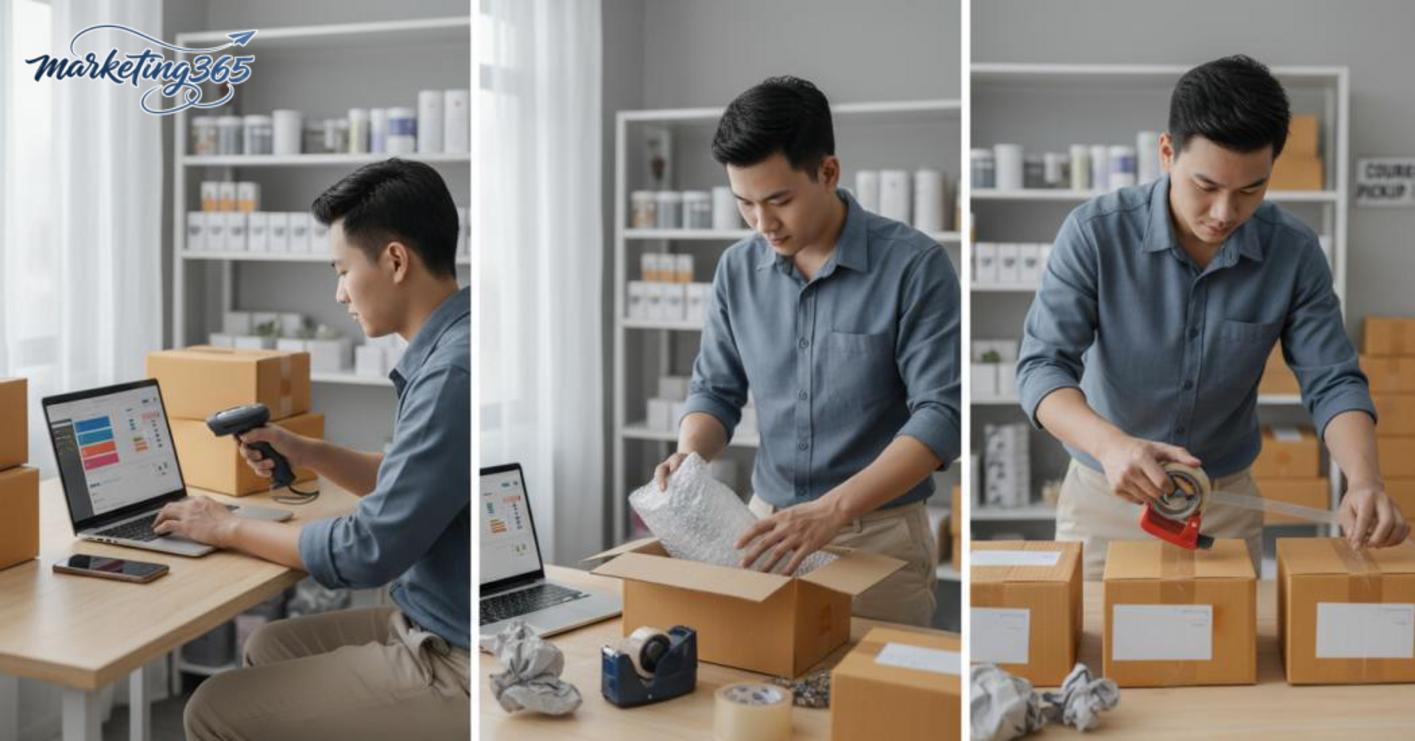
If an order has been pending too long, prioritize confirming whether the item is still in stock before moving forward. If the variation is wrong or stock is missing, stop new handoffs immediately and recheck the order code, packing photo, and actual quantity. For how to sell on Shopee for beginners, fixing issues early is always easier than waiting for complaints to arise.
What to do so a new shop doesn’t just get “posted and left there”
If a new shop wants good signals, it has to maintain a steady rhythm of activity and not let products sit there after being posted. With how to sell on Shopee for beginners, the top priority is completing the shop information, updating products, keeping inventory accurate, and replying to chat quickly so you don’t lose orders because of operational mistakes.
What should you prioritize on the first day the shop opens?
During the first seven days, follow this order: 1) complete the shop profile and profile image, 2) upload the main product groups, 3) check variations and inventory, 4) reply to chat within a short time window, 5) review display errors in Seller Center. If you’re just learning how to create a Shopee shop, don’t focus on promotions before your product data is correct.
A new shop only needs one mismatched variation stock count to cause an order to go to the wrong item or be canceled. So after listing products, open each listing to check the name, price, image, variation, and remaining stock. If you sell many SKUs, it’s best to maintain a separate tracking sheet to avoid overlapping updates.
Read more: How to List Products on Shopee with SEO for Beginners
What signs show that the shop is running well?
A shop is running well when products display fully, orders come in with the correct variation, chat gets responses, inventory matches, and shipping information doesn’t get stuck. These are the foundational signals that make optimizing a newly opened Shopee store actually work, instead of just looking good on the surface.

If you notice orders going to the wrong variation, products disappearing from display, or chat being left unanswered for too long, fix the shop profile, description, and inventory immediately before thinking about increasing Shopee sales. A healthy store is one with few operational errors, not one with lots of posts.
Common mistakes beginners make when selling on Shopee
The common mistakes beginners make when selling on Shopee usually come from poor setup, incorrect information, mismatched inventory, and slow customer responses. With how to sell on Shopee for beginners, you should fix the issues that directly affect visibility and orders first, because those are the mistakes that cost the shop time and credibility the fastest.
Which mistakes waste the most time for a new shop?
The most time-consuming mistakes are listing Shopee products with missing information, blurry images, slow inventory updates, not tracking orders, and replying to customers slowly. A new shop only needs to forget inventory synchronization once to end up handling canceled orders, apologizing to customers, and editing each product one by one. Likewise, descriptions that leave out size, material, or usage instructions cause repeated questions, which makes the Shopee order-processing workflow for beginners drag on longer.

Common mistakes can be viewed in a “mistake – consequence – fix” format:
- Blurry images, weak titles: customers scroll past, and product click-through drops. Fix the main image first, then make the title clear about the product type, use case, and variation.
- Thin descriptions: customers keep asking the same questions. Add specifications, usage, returns, and storage notes.
- Mismatched inventory: you accept an order and then say it’s out of stock. Check inventory daily, especially if you sell across multiple channels.
- Slow replies: customers switch to another shop. Prepare quick-reply templates for the five most common questions.
What order should you follow when fixing errors?
Fix them in this order: images and titles first, descriptions second, then inventory checks, order-process standardization, and finally display optimization. This is the lowest-risk way to optimize a newly opened Shopee store because it reduces visible errors on the product page and lowers the number of faulty orders.
In practice, you can follow four steps:
- Adjust the cover image, product name, and variation so customers understand it correctly from the start.
- Complete the description with specifications, usage, processing time, and return conditions.
- Reconcile inventory to avoid selling beyond available stock.
- Standardize confirmation, packing, and response steps so work doesn’t pile up later.
If you’ve just opened the shop, simply fixing things in this order will already reduce many of the mistakes to avoid when selling on Shopee.
When should beginners do it themselves, and when should they seek professional support?
Beginners should do it themselves when the shop has only a few products, the workflow is simple, and you can monitor orders, chat, and inventory every day. With how to sell on Shopee for beginners, the early stage should focus on three things: creating the shop, listing products, and processing the first order correctly. For example, a phone-accessory shop with 5–10 products and 1–2 variations per product is usually manageable for the owner without becoming overwhelming.

When should you do it yourself?
Doing it yourself is suitable when you can spend 1–2 hours a day in Shopee Seller Center, reply to chat during the day, and check order status. If the shop only has a few items, product photos are already prepared, descriptions are short, and shipping settings are not too complex, you can launch it yourself. This approach helps you understand the workflow from listing products to confirming orders and updating inventory.
A simple rule is: if you can handle all issues without having to stop selling for too long, do it yourself. For example, a newly opened phone-accessory shop usually only needs to track incoming orders, prepare items the same day, and update quantities after each order. When the number of products grows to 20–30 SKUs or there are many color and size variations, doing it yourself is still possible, but it requires more discipline.
When should you seek professional support?
You should seek support when the shop has many products, many variations, or needs to be standardized from the start to avoid rework later. If the store has more than 50 SKUs, descriptions are inconsistent, images are not standardized, and the order-processing workflow is unclear, an experienced person can help reduce setup errors. It’s also a sensible choice when the shop is your main sales channel and any mistake in categorization, pricing, or shipping directly affects orders.
Professional support is also useful when you don’t have someone monitoring operations regularly. For example, if you only check the shop once a day, it’s easy to miss customer chats, pending orders, or negative inventory on a few products. In that case, having someone familiar with Shopee Seller Center review the catalog, product attributes, and order workflow will save more time than repeatedly fixing things yourself.
Frequently asked questions about how to sell on Shopee for beginners
Beginners selling on Shopee often ask four questions: how much capital they need, whether they can sell using a phone, what they should prepare before opening a shop, and where they should start. The short answer is: you can start with a small budget, do everything on a phone if needed, but you should prepare your product source, product photos, basic descriptions, and order-processing workflow before listing.

- How much capital do you need to start? You don’t need to hold a large amount of stock at the beginning. You should only budget for sample purchases, packaging materials, and a reserve for returns.
- Can you sell using a phone? Yes, especially in the early stage when you need to list products, reply to chat, and track orders in the app. However, if you have many SKUs, a computer is easier for editing descriptions and managing inventory.
- What should you prepare before opening a shop? At minimum: shop name, product categories, real photos, selling prices, return policy, and packaging method. Without these, the shop can easily become slow to respond or send the wrong orders.
- Where should beginners start? Open the shop, list 3–5 core products, then focus on completing the title, cover image, short description, and operational metrics such as chat response rate and preparation time.
If you want to move faster, create a one-day checklist: open the shop, list products, check shipping, and try placing an internal test order to see where the workflow breaks down.
For the latest official guidance, you can also refer to resources from Think with Google.
You can find more practical marketing guides at https://marketing365.vn.
Content from marketing365 is created for SMEs, online shop owners, and new marketers.
You can also read more articles on the same topic in the Ecommerce Marketing category.



